
Graphic Equalizer Studio2015 - Download
You'll be able to download in few seconds.
Publisher Description
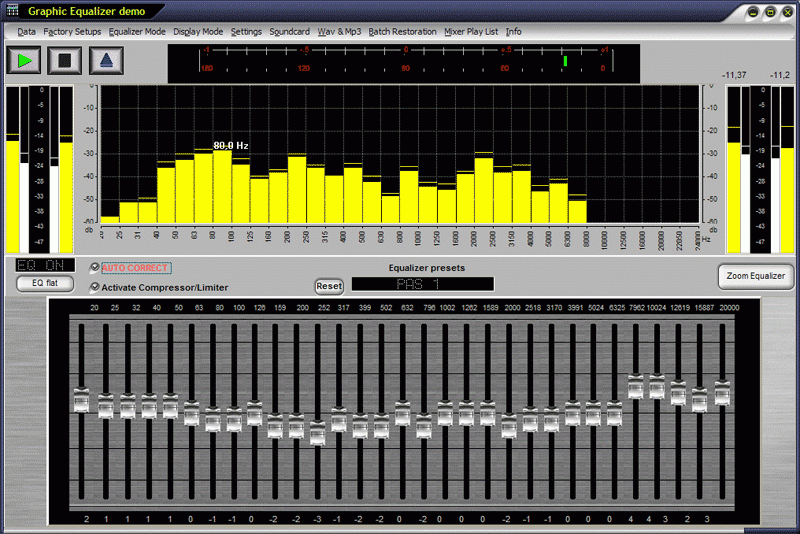
Graphic Equalizer works together with Winamp, iTunes in realtime !!! * Mixer Play List (use it like Windows Media Player) *Batch Restoration Tool for your MP3 files ** RMS Level Meter and Peak Level for the Input and Output * integrated Compressor, Limiter und Enhancer * 1/3 Octave displaying for the frequency bands * Automatic Calculation of Band Frequencies with Octave selector * DSP Normalization of Wave files * Programmable Frequency selection with independent Band Calculator * Programmable Q-Factor for fine-tuning separate configurations* Configurations saved in 2 convenient locations for reloading all project data * Automated Equalization of Live Audio in Real time for evaluation via external support * Automated Real time Equalization of all Digital Audio infinitely with no loss of quality * MP3 Player / Refresher * Q-Factor for fine-tuning separate configurations* Sync to loop feature for specific evaluation of Digital Audio files* Programmable Frequency selection with independent Band Calculator Programmable *Whhen Auto Correct is enabled, it will scan all selected frequencies in the wav file to determine the minimum and maximum amplitudes.It will then correct these variations by automatically increasing or decreasing the levels of attenuation at specific frequency intervals (usually 1/3 octave).
The result is a nearly linear frequency response. For the listener, this creates more consistent sounding audio. A typical application that would benefit from this tool is an internet radio station. A common problem that many of these stations experience is an inconsistency in true audio reproduction (i.e., different songs sound different).
About Graphic Equalizer Studio
This program is available in English. It was last updated on 29 September, 2026. Graphic Equalizer Studio is compatible with the following operating systems: Windows.
The company that develops Graphic Equalizer Studio is PAS-Products. The latest version released by its developer is 2015.
The download we have available for Graphic Equalizer Studio has a file size of 8.4 MB. Just click the green Download button above to start the downloading process. The program is listed on our website since 2015-03-19 and was downloaded 0 times. We have already checked if the download link is safe, however for your own protection we recommend that you scan the downloaded software with your antivirus. Your antivirus may detect the Graphic Equalizer Studio as malware if the download link is broken.
How to install Graphic Equalizer Studio on your Windows device:
- Click on the Download button on our website. This will start the download from the website of the developer.
- Once the Graphic Equalizer Studio is downloaded click on it to start the setup process (assuming you are on a desktop computer).
- When the installation is finished you should be able to see and run the program.
Program Details
System requirements
Download information
Pricing
Version History
version 2015
posted on 2015-03-19
Graphic Equalizer works in realtime with Winamp, iTunes Windows 8
version 2007
posted on 2007-02-05
Mp3 Tag compatible
Disclaimer
External Download
We do not host Graphic Equalizer Studio on our servers. We did not scan it for viruses, adware, spyware or other type of malware. This app is hosted by the software publisher and passed their terms and conditions to be listed there. We recommend caution when installing it.
The external download link for Graphic Equalizer Studio is provided to you by apps112.com without any warranties, representations or guarantees of any kind, so access it at your own risk.
If you have questions regarding this particular app contact the publisher directly. For questions about the functionalities of apps112.com contact us.
